Binding buttons#
Keys and buttons#
A key is a physical thing on a tile. Keys are numbered from 0 within their tile, and a key on its own does nothing.
A logical button is what the Driver Station sees. There are 32 of them, numbered 1 to 32, and they exist whether or not anything is bound to them.
Binding connects the two. Until a key is bound, pressing it registers nowhere.
Robot code refers to the button number, so it does not change when Button 7 moves to a different key, tile, or kind of tile.
Binding a key#
In Configure, click the key on its tile. The Reports as panel shows the 32 buttons twice: as a numbered grid, and placed on an Xbox-style gamepad. Click a button in either view to bind the key to it. The bound button is highlighted.
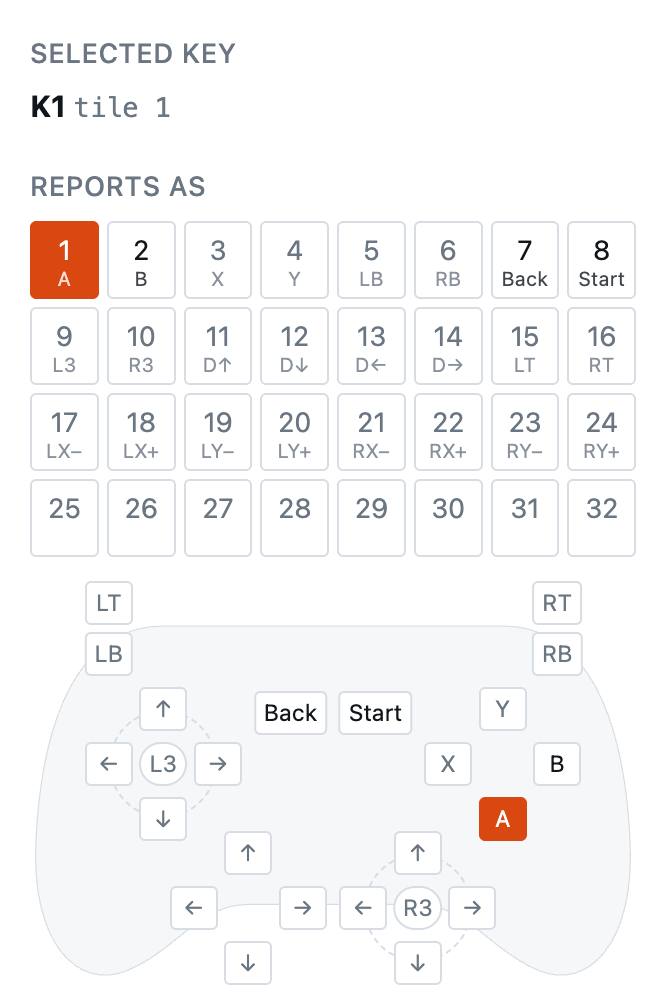
Under each number is the Xbox control that button becomes in FTC (xinput) mode. Buttons 25–32 have no Xbox control, so FTC mode does not send them.
To bind by pressing instead, click Press a key… and press the key on the board. It takes the button shown, or the next free one if the selected key is not bound.
Rebinding a key to a different button replaces the old binding, including any combo the key was part of.
Groups: several keys, one button#
Several keys can feed the same button. The button is pressed while any of them is down. Use this for:
- The same action reachable from two ends of a wide panel.
- A driver and a co-driver who each need the same override.
- An arcade button and a keypad key that do the same job.
Add the key to an existing button rather than replacing it. Up to 16 keys can share one button.
Combos: one key, several buttons#
One key can press several buttons at once, and releasing it releases them all together.
This is for FTC: the Driver Station assigns a pad to gamepad 1 when it sees Start+A, and to gamepad 2 on Start+B. Bind each combo to one key.
In Configure, click the key, then:
- Start+A or Start+B sets that combo in one click.
- Combo turns on toggling: each number you click is added to the key, or taken off it. Click Combo again to go back to picking one button.
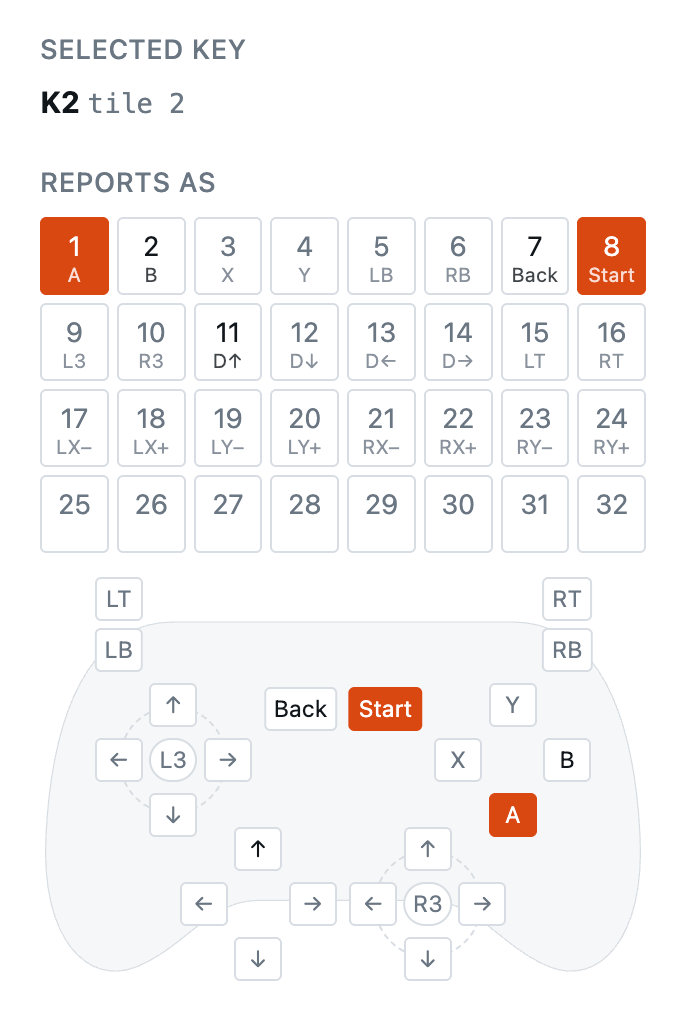
The key shows every button it feeds, for example B1+8. A combo does not take the buttons away from other keys: a key bound to Start+A and a separate key bound to Start both work.
If the buttons in a combo have different LED colours, the key shows the colour of the lowest-numbered one.
The Driver Station sees every button in a combo change in the same instant, not Start first and then A. Whether the Driver Hub accepts simultaneous presses has not been tested on one yet. If it does not, bind Start and A to two separate keys.
Debounce#
The tile debounces every key. The default is 5 ms, or 20 ms on arc4.
To change it, select the tile in Configure and set Debounce, under the tile, from 1 to 255 ms. It applies to every key on that tile, and every press on that tile is delayed by the same amount. Default puts it back. Press Save to keep it.

Raise it if a switch chatters, usually a worn arcade microswitch.
What happens when a tile disappears#
If a tile stops answering — cable pulled, board damaged — every button bound to it reads as released, immediately.
Bindings to a missing tile are kept, not deleted, so a tile that is unplugged and plugged back in keeps its bindings.
Swapping and replacing tiles#
Bindings are stored against a tile’s position on the bus, and the board remembers which physical tile was in each position.
- Replace a broken tile with an identical one — the new tile takes the old one’s place and its bindings, automatically.
- Add another tile of the same kind — it is a new tile, and starts unbound.
When the board cannot tell those two cases apart, it says so, and the config app offers the choice.
Saving#
Bindings work as soon as they are made, but live in RAM until you press Save. Save writes them to flash and reads them back to check.